


CartoonDream-Aging Face Filter
4.4857.00 Reviews
App Specs
- Version
- 1.3.9
- Updated On
- License
- Free
- Downloads
- 500,000+
- Developer
- FutureDream Entertainment Limited
- Categories
- Art & Design
- Platform
- Android
Screenshots
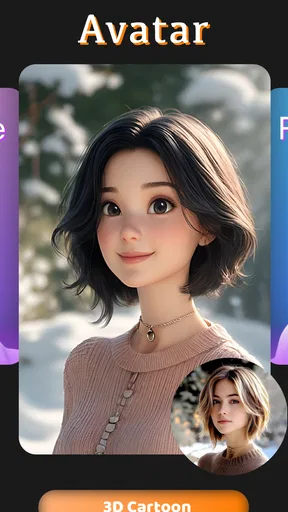
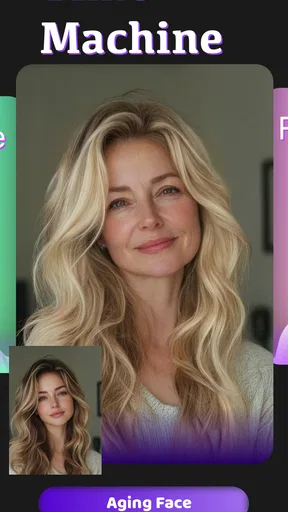
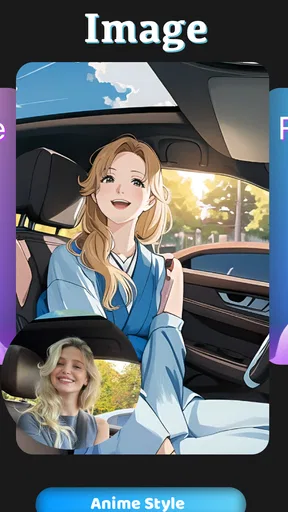
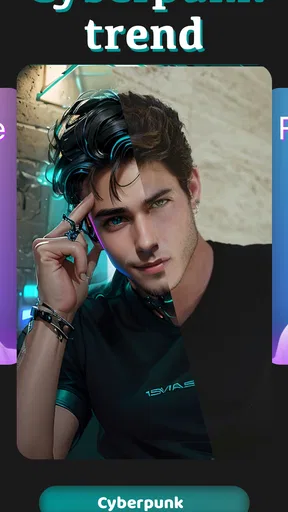
 Analysis by AppCompare
The first appeal of CartoonDream-Aging Face Filter is easy to understand: you can take an ordinary portrait and turn it into something playful in moments. I’d reach for it when I have a spare minute, want a silly image to send a friend, or am curious about how a cartoon treatment might reinterpret my face. Its two central ideas—cartoon styling and an older-looking version of a face—give the app a clear purpose without asking me to learn a full photo editor.
Why the first few tries are fun
For a casual user, the low-effort setup is a real strength. I can start with a selfie or pick a picture from my gallery, then see the result without first learning layers, brushes, or detailed editing controls. That makes the app approachable when I want a quick visual surprise rather than a project. The cartoon effect is more personal than a generic sticker: it aims to preserve recognisable facial details while changing the overall look.
The aging effect has a different kind of appeal. It invites curiosity, but I treat the result as a playful interpretation rather than a forecast. A filter can suggest wrinkles or gray hair, yet a portrait transformation cannot tell me what I will actually look like later in life. Keeping that distinction in mind makes the image entertaining without giving it more meaning than it deserves.
A practical first-use tip is to choose a clear, front-facing portrait with the face easy to see. That gives the transformation a better starting point than a dim picture, a strong side angle, or a group shot where it may be unclear which face I want to edit. If I’m choosing an image for a joke or a group chat, I also check that the original crop leaves enough room around the head; a tight crop can make a finished portrait feel awkward when shared.
How it fits into a real day
Imagine a friend group is planning a video call and someone wants an easy icebreaker. I could make an aged version of my own selfie, send it to the chat, and let everyone guess whose portrait they are looking at before revealing it. The image is the activity, not a reason to spend an evening editing. That is where this app makes the most sense: quick, low-stakes amusement that can be shared when the moment calls for it.
It also suits people who like experimenting with profile pictures or making a lighthearted image for a birthday message. I would keep the original photo and the edited result as separate choices, though. A cartoon portrait can be fun for a social profile, while an aged image may work better as a one-off joke than as a lasting picture. Thinking about where an image will appear before sharing it helps avoid sending a playful edit into a context where it could be mistaken for a serious portrait.
Because the experience centers on transforming portraits, it is not a substitute for a general-purpose editing app. If I want to fine-tune color, remove a distracting object, add precise text, or build a carefully composed graphic, a broader editor is the better tool. CartoonDream is most useful when I want its particular transformation quickly, not when I need control over every part of an image.
Worth Reading Before You Choose

Baby Panda World Brings Quick Play to Modern Phones, but Its Game Library Feels Busy

ESPN’s Live Game View Makes Following Close Games Easier

QuizzLand Review: A Good Fit for Short Trivia Breaks, Not Every Player

Basketball Stars: Multiplayer Is Fast, but Can It Recover When Matches Go Wrong?

WEBTOON Turns Phone Updates Into a Better Reading Routine

Link to Windows Runs on Shared Habits, Not Social Feeds
Transforming Your Selfies
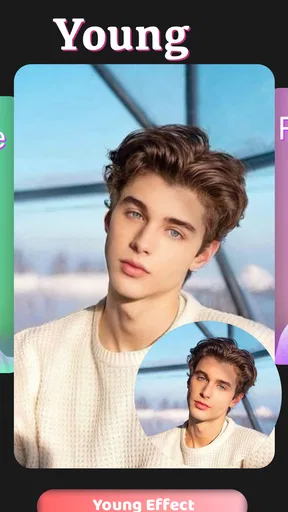
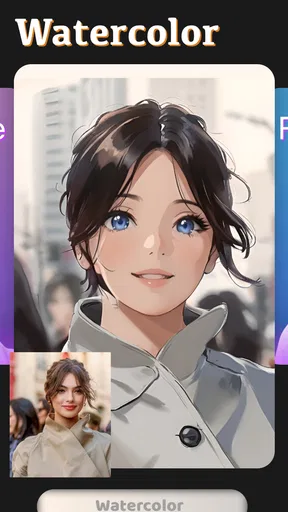
First things first, the transformation process is super easy. You simply snap a selfie or choose one from your gallery, and voilà, you’re just a tap away from morphing into a cartoon version of yourself or seeing how you might age. This app uses some pretty clever AI technology to make these changes look surprisingly realistic.
What impressed me is the level of detail. The cartoon filter doesn’t just slap on some generic big eyes and a small mouth. Instead, it captures the nuances of your face, giving you a unique cartoon look. It’s like having your own personalized animated character, which I think is pretty cool.
Aging Gracefully (Or Not)
The aging filter is where things get really interesting. I have to admit, I was both curious and a bit apprehensive to see an older version of myself staring back from the screen. But wow, the detail is incredible. Wrinkles, graying hair, and all those little touches make it look eerily convincing.
This feature is perfect for a good laugh with friends or even just to satisfy your curiosity about how genetics might play out over the years. It’s fun to speculate, and the app makes it easy to share these images across social media, so you can get everyone in on the joke.
Choosing it over a full photo editor
Compared with the usual alternatives in art and design, this is a narrow, ready-to-use creative tool rather than a workshop for building an image from scratch. A traditional editor gives me more options and asks me to make more decisions; a social camera app may put its emphasis on live effects; this one is for applying a distinctive portrait transformation with little setup. That focus is convenient, but it also means I would not install it expecting a deep set of controls or a complete creative workflow.
That trade-off matters if I am deciding whether it deserves a regular place on my phone. I would keep it around if I often make playful portraits, share edits with friends, or enjoy trying a different look on new photos. If I only want one aged selfie for a laugh, the novelty may fade once I have tried the effect a few times. In that case, it can be a fun occasional download rather than a daily-use app, and there is nothing wrong with that.
When a result looks less convincing than expected, I would first try a different source photo rather than assume the filter itself is useless. Even lighting, a visible face, and a straightforward expression give the app cleaner material to work with. A busy background or a partially covered face can distract from the result. This small choice is a useful way to improve the odds of getting an image I actually want to keep or share.
User-Friendly Interface
I’ve tried a bunch of photo-editing apps in my time, and what often gets me is a clunky interface. Thankfully, CartoonDream-Aging Face Filter keeps it simple and intuitive. Everything is neatly organized, and the learning curve is pretty much non-existent. Even if you’re not particularly tech-savvy, you’ll find it a breeze to navigate.
The app doesn’t bombard you with ads, which is a relief. It’s all about getting you straight to the fun part without any unnecessary distractions. Downloading the app is straightforward, and it runs smoothly without crashing or lagging, at least in my experience on both Android and iOS.
What to expect from ongoing use
For a quick decision about trying it, the basics are reassuring: it is a free art-and-design app from FutureDream Lab, rated for Everyone, and it has an average rating of 4.4 from around 3.4 thousand ratings. It has passed 500 thousand installs, which suggests that portrait transformations have broad casual appeal. The app was released on March 24, 2024, and version 1.3.9 is listed as the current version. It supports Android 6.0 and later.
Free to install does not mean every possible use is necessarily free. In-app purchases are listed from $24.99 to $159.99 per item, so I would check what an optional purchase actually includes before paying. If I only want to test the core idea, I would begin without buying anything and decide whether I use the app often enough to justify spending. Those listed purchase amounts are substantial compared with a throwaway novelty, so the value depends on recurring use, not just on enjoying one surprising result.
For month-to-month value, I would judge it by whether it keeps earning a place in a small routine: perhaps making a portrait for a friend’s birthday, trying the effect on a fresh selfie, or using a cartoon image when I want a less formal profile picture. Repeating the exact same experiment can get stale, so changing the source photo or sharing the result in a different social setting is more likely to keep it interesting. I would not expect a dedicated portrait filter app to replace a photo editor I rely on for regular projects.
There is also a sensible sharing habit worth keeping. Before sending a transformed face beyond a private chat, I pause to consider whether the person in the image would be comfortable with it being circulated. That is especially useful when editing someone else’s portrait: a funny result can still feel personal. The app’s best social use is one where everyone involved understands the image is a joke and is happy to join in.
Endless Fun with Friends
One of the things I love most about this app is how social it is. You can create hilarious before-and-after images, share them with friends, and even get them to join in the fun. There’s something about seeing your friends’ cartoon and aged versions that makes the experience even more enjoyable.
Whether you’re hosting a virtual hangout or just need a quick icebreaker, these images are guaranteed to get everyone laughing. Plus, it's a great way to create some unforgettable memories, even if they’re just digital.
When the novelty wears off
The main source of fatigue is built into the concept: once I have seen a few versions of myself, the surprise naturally shrinks. The two effects offer different moods, but they still focus on the same basic activity of transforming a face. Someone looking for new drawing tools, varied artistic projects, or more control over the finished composition may soon want a broader app instead.
I would also skip it if my priority is a dependable tool for professional portraits or a precise representation of aging. The results are for entertainment and personal creativity, not a reliable guide to appearance or a replacement for careful retouching. Likewise, anyone who dislikes sharing edited selfies or simply has no interest in face filters may find that the app’s main appeal does not match their needs.
That does not make the app disposable for everyone. A focused tool can be more pleasant than a crowded editor when the task is simple. I like that I can go straight to a cartoon or aging treatment without turning a quick joke into a complicated design session. Its lasting value is therefore personal: it depends on whether these particular transformations are the kind of small creative diversion I return to.
Final Thoughts
All in all, CartoonDream-Aging Face Filter is a fantastic app if you’re looking for something light-hearted and entertaining. The combination of cartoon and aging filters makes it versatile and keeps the fun going. It’s the kind of app you didn’t know you needed until you tried it. So, if you’re up for a bit of fun and laughter, give it a go. Trust me, you won’t be disappointed!
My longer-term verdict is a little more specific: I would recommend it to friends who enjoy sharing playful portraits and want a quick way to change the mood of a selfie. I would not recommend treating it as an all-purpose design studio, a serious aging prediction, or an app everyone needs to use every day. Its appeal is strongest when a clear photo, a curious moment, and a willing audience come together. If that sounds like your kind of fun, the free download gives you a straightforward way to see whether the novelty becomes a recurring little pleasure.
Pros
- Fun and easy-to-use interface
- Realistic aging effects
- Various cartoon styles available
- Quick processing time
- No account sign-up required
Cons
- Contains frequent ads
- Limited free features
- Watermark on free version
- Occasional app crashes
- Requires internet connection
FAQs for CartoonDream-Aging Face Filter
What is CartoonDream-Aging Face Filter and how does it work?
CartoonDream-Aging Face Filter is a fun and engaging app that allows users to transform their selfies into cartoon-style images or see an aged version of their face. Utilizing advanced AI technology, the app analyzes facial features and applies filters to create a unique and personalized cartoon or aging effect. It's perfect for social media sharing and exploring creative photo transformations.
Is CartoonDream-Aging Face Filter free to use?
CartoonDream-Aging Face Filter is available as a free download with basic features accessible at no cost. However, it offers in-app purchases for premium filters and additional functionalities. Users can choose to subscribe or make one-time purchases to unlock the full range of effects, which enhances the user experience with more creative options.
What are the system requirements for CartoonDream-Aging Face Filter?
CartoonDream-Aging Face Filter is designed to run on both Android and iOS devices. For Android, it requires version 5.0 or higher, while iOS users need to have version 11.0 or later. The app is optimized for performance on a wide range of smartphones, ensuring smooth operation across different models and screen sizes.
How does CartoonDream-Aging Face Filter ensure user privacy?
CartoonDream-Aging Face Filter takes user privacy seriously. The app only processes images locally on your device, ensuring that no personal photos are uploaded or stored on external servers. Additionally, the app complies with standard data protection regulations, providing users with control over their data and ensuring a secure experience.
Can I share my creations from CartoonDream-Aging Face Filter on social media?
Yes, CartoonDream-Aging Face Filter makes it easy to share your cartoonized or aged photos directly to social media platforms. The app includes built-in sharing options for popular networks like Instagram, Facebook, and Twitter, allowing you to showcase your creativity and engage with your friends and followers effortlessly.


